Dialect
Translates network device configs between vendor dialects, offline.
Nothing leaves your computer. The web page runs entirely in your browser: its content security policy blocks every network connection, so your configuration is never uploaded.
What it is
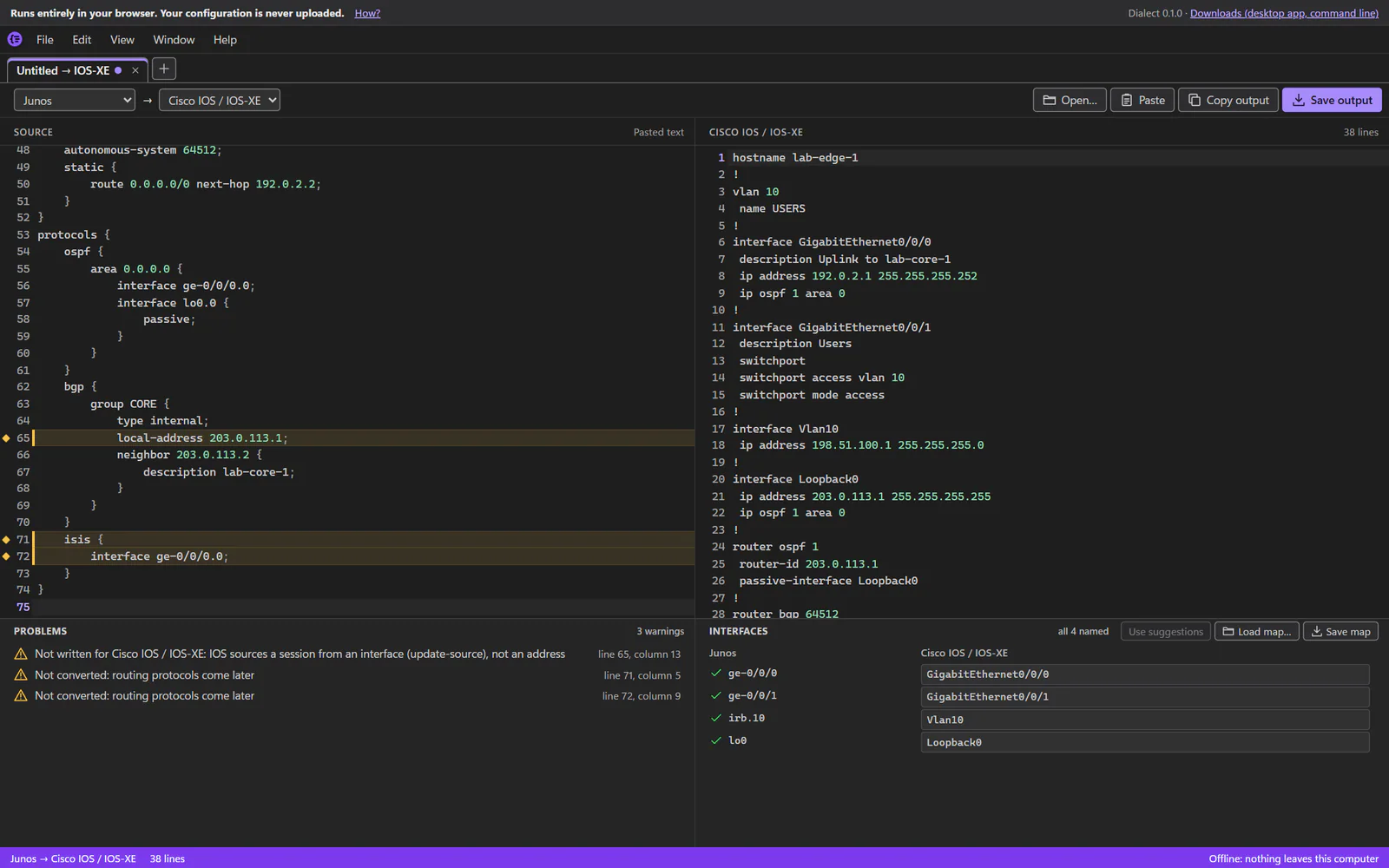
For network engineers who work across vendors: paste or open a config from one platform and get it in another’s dialect, with every line that didn’t carry over listed and the reason why.
It turns hierarchical Junos config into display set commands, and converts configs between Junos, Cisco IOS / IOS-XE, NX-OS and IOS-XR. Each platform is built as its own plugin, all from one TypeScript core.
What it converts
- Interfaces, VLANs, switch ports and VLAN interfaces (IRB), with link aggregation
- Static routes, OSPF and BGP, in the global table and in VRFs
- Routing policy: prefix lists, communities, AS paths, route maps and policy statements
- Firewall filters and access lists, IPv4 and IPv6
- Junos hierarchical config to
display setcommands
Nothing dropped silently
- What it can’t convert is listed, never dropped silently, each by its line with the reason.
- Interface names are never guessed: Dialect suggests them (
ge-0/0/0→GigabitEthernet0/0/0) and uses one only when you take it, or from a map file. - Keys and passwords are never carried over: it asks for them, and messages never quote your config.
Ways to get it
Every release on GitHub has these downloads, and the web page is also online, with nothing to download.
| Download | What it is |
|---|---|
Dialect_<version>_x64-setup.exe | The one most people want. The desktop app and the dialect command, for you alone (no admin rights). It needs internet only on the rare PC without Microsoft WebView2. |
Dialect_<version>_x64-offline-setup.exe | The same, for a PC with no internet: Microsoft’s WebView2 installer is inside, so it’s much bigger. |
dialect-cli.exe | The dialect command on its own: one file, nothing to install. Rename it dialect.exe to type dialect. |
dialect.html | The app as one web page: open it in Edge or Chrome, from any folder or a USB stick, with no network. |
Before you use it
- Review converted configuration before applying it to a device. Dialect reports what it couldn’t convert, but you are responsible for what you deploy.
- Windows x64 only for the downloads; none needs anything else installed (no Node.js, no runtime).
- Not code-signed yet, so Windows SmartScreen may warn about the downloads: choose More info → Run anyway. The release notes give each download’s SHA-256.
- No automatic updates yet: Dialect doesn’t check for new versions. Look at its releases on GitHub.
Open source
Dialect is free and open source under the MIT License.
© 2026 Darren Marshall. Dialect is independently developed and isn’t affiliated with, endorsed or sponsored by Juniper Networks or Cisco Systems. Juniper and Junos are trademarks of Juniper Networks, Inc.; Cisco, IOS, IOS-XE, NX-OS and IOS-XR are trademarks of Cisco Systems, Inc.